Showing posts with label Domain. Show all posts

February 27, 2009

Configure Free Domain 4 Google Apps Part1

After Finish free domain setup in Co.cc domain, leave the page open. now open a window or new browser tab and go to the registration page standard Google Apps account by clicking here.


Step 1


On that page click on the option Administrator: I own or control this domain, then enter the domain name. Co.cc previously registered resumed click Get Started.


Step 2
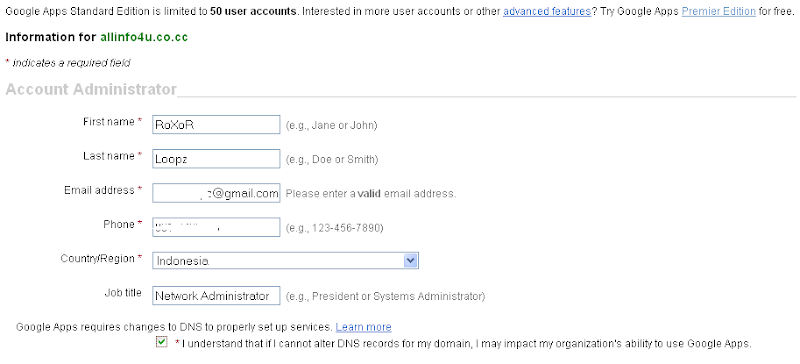

fill address, telephone, Default amount for standart account/free service google give 50 account for you. After all the required information has been input, click the Continue button.


Step 3


Next is making for the domain Administrator account which is registered. Here we enter the username and password for the administrator account. This administrator account will be used for all the Google Apps services-related domains registered, including the right to add the user. Here will also be shown the Terms and Conditions must be approved if you want to use Google Apps services. Then click the button I accept. Continue with set up.


Step 4

For the next page you can access through the address

https://www.google.com/a/yoursitename.co.cc

for example, for domain allinfo4u.co.cc
https://www.google.com/a/allinfo4u.co.cc

then next step to verify domain ownership. see screenshoot


Next you will be entering the verification of domain ownership. There are two methods that can be selected, but for use with a Co.cc domain, here we choose how to Change your CNAME record. Here you are given instructions how to verify the method. To note is the name of the CNAME should be made as in point 2 of my selection as visible on screenshoot. To facilitate the next step,
you name CNAME make selection and copy.


*. before you click verify go to step 5

Step 5

open new browser go to Co.cc → Log-in your account → Domain Settings → Select domain → Click "Set up" box → Zone Records → Add record as below Go to manage, expand the domain name, select Edit DNS and then edit the DNS zone. open to create a CNAME record. For this we click on option 2, namely Zone Records.

Then you paste the name of the CNAME should be made before a copy of your instructions in the Google Apps page in the Host field in the domain name followed co.cc. for example for the domain entered see screenshoot.


For Type / Pri select CNAME, and Value to enter google.com. Then click the Add button Record.

Step 6

Back to page setup in Google Apps, you can now click the Verify button. Next you will return to the Dashboard page and get the information that is being done checking domain ownership and this can take up to 48 hours. Based on my experience, the time required for that. While waiting, we proceed step that can be done following the activation email by clicking the Activate link in the email settings in the Service Dashboard. see screenshoot.


On the next page, you will be given instructions to create MX records for domains that can be done on the settings of the domain, in this case is in the Co.cc. Here, given the table contains a list of MX Server Address with the value priorities that must be entered as the MX record. Must be observed that the order of priority herein is set up by Google, and we should not change the order of priority among the servers. If you must change this value, it must keep the sequence of a given priority.


Before clicking the button, the next step is to return to the settings page Co.cc. domain

add the MX records and priority as provided by Google at the top. For each record is the same. For Host, enter your domain name, for example allinfo4u.co.cc. For Type / Pri Priority select MX and filled according to the given Google the above, for example 10. Value to enter the MX server address is, for example ASPMX.L.GOOGLE.COM. Then click the Add button Record. see complete screenshoot.
Do the same for all record the other to complete.


go back to the Google Apps page and click the button I have completed these steps and you will be taken back to the Google Apps Dashboard


check first your work :D

http://mail.google.com/a/allinfo4u.co.cc


February 21, 2009

Configure Free Domain With Blogger

I just register a free domain for my other blog and I confess that it was nothing easy to setup! I found many references on Google and had to add more to get everything to work correctly. Something like that, ok here easy guide..

First, you need to find the free domain. There are many blog for this purpose, but I choose Blooger. Between the link shown and enter the address you want to assign to your blog. In my case was allinfo4u. Click check availability and the fields appear available see screen shoot.


Choose what name you like and click continue to registration. Make your registration, and wait for an email confirm, or if u not have account you can register here :Co.Cc - Free Domain

SETUP DNS

Blogger are hosted on Google servers and need to be directed to the new domain. The first thing we should do is to enter the Control Panel of the site where the domain was registered (in our example is co.cc) and change the DNS.
  • Step 1.
  • go to Co.cc → Log-in your account → Domain Settings → Select domain → Click "Set up" box → Zone Records → Add record as below Go to manage, expand the domain name, select Edit DNS and then edit the DNS zone.


    1. click host then type www.yoursite.co.cc
    2. click TTL choose 1D
    3. click CNAME field and type ghs.google.com. then click Set up.
    4.done

    SETTING BLOGGER

  • Step 2.
  • Blogger → Log-in your account → Settings → Publishing → Click "Custom Domain" link → Click "Switch to advanced settings" link → Enter your co.cc domain name as below → Fill in the blank → Save settings


  • Step 3.
  • All you need to do is wait for 48 hours!
    Generally, it takes about 48 hours for the CNAME changes to propagate over the Internet. oh don't forget to tick redirect. see a picture

    From now on, your blog will be directed to the new domain! Click the link below
    www.allinfo4u.co.cc


    *. see official custom domain here

    February 20, 2009

    History of Domain Names

    By: Nicholas LaPolla

    What is a domain name? A domain name is a unique name, kind of like an e-mail address is unique, which is registered in a database called WHOIS through an organization called Network Solutions, Inc. (NSI). The domain name corresponds to a unique set of numbers called an IP (Internet Protocol) address. The reason we use domain names instead of IP addresses is that they are closer to our language. It would be difficult to market a site like this: "Go to 64.233.167.99 or 216.109.112.135 to search the internet!" A much easier way to do this is to say "Go to www.Google.com or www.yahoo.com to search the internet!" (Both Google and Yahoo are trade marked by Google, Inc., and Yahoo, Inc., respectively).

    A domain name points to a computer called a "name server". The name server knows that your domain name corresponds to your web hosting server's IP address and it routes the person who typed in your domain name to your web hosting server - to your web site. That is how people anywhere in the world can see your web site by typing your domain name.

    In 1992, the National Science Foundation granted an exclusive contract to NSI to be the sole registrar of top level domain names. NSI also had a cooperative agreement with United States Department of Commerce ("DoC"). With no competition, consumers were at the mercy of NSI.

    In 1998, NSI and the DoC amended their cooperative agreement to allow for competing registrars. NSI was forced to provide domain name registration to the competing registrars at wholesale prices, rather than the standard $34.99 annual fee. NSI still charges $34.99 per year.

    In late 1998, the DoC assigned the responsibility of overseeing the transition to a competitive market for domain names and accreditation of new registrars to a new organization called the Internet Corporation for Assigned Names and Numbers (ICANN).

    In 1999, ICANN began taking applications from companies who wanted to become registrars - and then capitalism took over: companies had to compete for business. Prices came down and service improved, however some are better than others. For a more detailed history of this transition, visit www.icann.org/registrars/accreditation-history.htm.

    Even with the positive effects of competition in the domain name marketplace, the process of internet domain name registration remains a mystery for many.

    There are a lot of companies that want to charge you hundreds of dollars to do the simple task of domain name registration for you. There are some registration companies who will charge you $35 just to register a domain. And there are web site consultants who charge over $100 to do the work for you. But you can do it yourself in about 15 minutes and it can cost as little as $1.99 for a year. If you do some research, learn a little and work smart, you can save yourself some money - and some headaches.

    Author Bio
    Nicholas LaPolla has been a web applications developer for 11 years. He created www.AcmeWebResources.com to help others build or improve, market, and monitize their websites with a focus on web design, website seo / internet marketing, and working to make money online.

    Article Link:
    http://www.articlegeek.com/

    February 3, 2009

    InMotion Hosting - Value Plans at One

    I am writing to let you know that I am extremely happy with the service that I have from InMotion Hosting. When I published my first website, I was intimidated by the whole process. The support that I received made me feel comfortable, and gave me the confidence to get up and running. The tech support response time is always quick and accurate. I will be adding 2 new websites which are currently in development. It's nice to know that you can still get good service and outstanding tech support, without the "downtime" that other web-hosting companies experience.
    Tech support has also been very helpful in helping me setup my account info in a quick, responsive manner. I opted for the "Premium Support" - and the extra programming help has been AWESOME! I will continue to recommend InMotion Hosting for webhosting services.


    Web Hosting by InMotion Hosting

    Plans Starting at Just $6.95/mo

    • Unlimited Disk Space • Unlimited Data Transfer

    • 90 Day Money Back Guarantee

    • True 24/7 Support

    Rated 3 Out of 3 Stars by CNET.com!


    VPS Hosting by InMotion Hosting

    Plans Starting at Just $39.95/mo

    • Full CPanel

    • RAID 5 Fault Tolerant Storage

    Data Backups Included

    • SSH Access

    • Individual Custom Firewall

    • 90 Day Money Back Guarantee

    • True 24/7 Support

    Rated 3 Out of 3 Stars by CNET.com!


    Dedicated Servers by InMotion Hosting

    Plans Starting at Just $199.95/mo

    • Pentium Dual Core, Quad Core or Xeon Quad Core CPUs

    • Full CPanel License

    • 160GB, 250GB or 250GB RAID1 HDDs

    • 1.5 Terabytes or More of Data Transfer

    • 2 Hour Hardware Replacement Guarantee

    • 2 GB or 4 GB of RAM Included!

    Rated 3 Out of 3 Stars by CNET.com!


    InMotion Hosting is proud to offer its cost effective Value Plans at one of the cheapest prices of any major web hosting company. When you are looking for personal / cheap hosting, price and features are critical. Our Value web hosting plans are feature rich including additional domain support, full email support, and 24X7 technical support. Rest assured, you will get the best quality hosting from InMotion - even if you are shopping for "cheap hosting".

    4 out of 5 clients have Business Class hosting. What should you choose?
    More Info Visit : Inmotinhosting.com

    January 23, 2009

    Free Domain at Co.Cc

    CO.CC has become the world's #1 choice for free domains by providing innovative, competitively-priced products, delivering the highest quality customer service, and by always appreciating and listening to its customers! To register you need email as username. That means one email account can be used to register a maximum of 3 domains.

    Available Services
    DNS Service - Delegate CO.CC domain like a .com
    Zone Records - Co.cc supports for CNAME, A, MX, NS records!
    URL Forwarding - Turn your long and boring URL

    You can register here: Join Now !

    CO.CC:Free Domain

      © Copyright 2008 -2009 Loopzfx | Some Rights Reserved